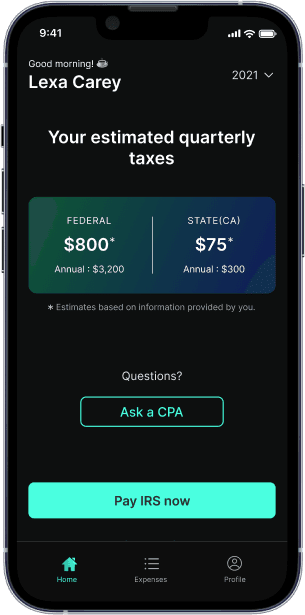
Quarterly tax deadline is Jan 15. See how much you owe penalties
1099 Tax Calculator

Are you self-employed?
This includes freelancers and business owners.
Doordash 1099-NEC: What is it and How Does DoorDash Report Income?
The1099-NEC formis a crucial document for self-employed individuals, including DoorDash drivers. This form is one of the essential doordash tax forms used to report nonemployee compensation, which includes income earned from freelance work, gig economy jobs, and other forms ofindependent contractorwork. DoorDash, like other companies that hire independent contractors, is required to issue a 1099-NEC form to its drivers if they earn more than $600 in a calendar year.
Table of contents
Understanding 1099-NEC and DoorDash Income
As a DoorDash driver, you are considered an independent contractor and will receive a 1099-NEC form to report your income earned from DoorDash. The 1099-NEC form will show your nonemployee compensation, which includes your earnings from delivering food and other items through the DoorDash platform. You will need to report this income on your tax return and pay federal and state income taxes on your earnings.
It’s essential to understand that as an independent contractor, you are responsible for paying your own taxes, including self-employment taxes. You will need to calculate your tax liability and make quarterly estimated tax payments to the IRS to avoid penalties and interest.
Threshold for Receiving a 1099 Form from DoorDash
To receive a 1099-NEC tax form from DoorDash, you must earn at least $600 in a calendar year. This threshold is set by the IRS to ensure that all independent contractors who earn a significant amount of money are reported to the tax authorities. If you earn less than $600, you will not receive a 1099-NEC form, but you are still required to report your income on your tax return.
Reporting DoorDash Taxable Income Even If You Don’t Receive a 1099
Even if you don’t receive a 1099-NEC form, you are still required to report your income from DoorDash on your tax return. This is because the IRS considers all income earned from self-employment to be taxable, regardless of whether you receive a 1099 form or not. As an independent contractor, you are responsible for ensuring you pay DoorDash taxes by tracking your earnings meticulously. You can find your earnings by logging into the DoorDash app and checking your earnings history. This information will help you accurately report your income on your tax return.
Importance of Keeping Accurate Records of Your Earnings and Tax Deductions
Keeping accurate records of your earnings is essential for several reasons. Firstly, it helps you accurately report your income on your tax return, which is crucial for avoiding penalties and interest from the IRS. Secondly, it allows you to claim business expenses as deductions, which can significantly reduce your taxable income. Finally, having detailed records can help you navigate any potential audits or inquiries from the IRS and effectively manage and estimate your tax bill.
Differences Between 1099-NEC and 1099-MISC for Gig Income
Before 2020, the 1099-MISC form was used to report nonemployee compensation. However, starting from 2020, the IRS introduced the 1099-NEC form specifically for reporting nonemployee compensation. The 1099-MISC form is now used for other types of compensation, such as rent and royalties. Understanding the difference between these forms is crucial for accurate tax reporting. The 1099-NEC form is specifically designed to report income earned by independent contractors, while the 1099-MISC form covers a broader range of payments. This distinction can significantly impact how much independent contractors owe in federal taxes.
Business Expenses and Write-Offs
As a DoorDash driver, you can deduct business expenses on your tax return to reduce your taxable income. Business expenses include:
- Mileage: You can deduct the standard mileage rate of 67 cents per mile driven for business purposes or track your actual expenses.
- Phone and service: You can deduct the portion of your phone and service expenses used for business.
- Health insurance: You can deduct health insurance premiums if you’re self-employed and meet certain requirements.
- Hot bags, blankets, and courier backpacks: You can deduct insulated bags and blankets used for work as an “ordinary and necessary” business expense.
- Tolls: You can deduct toll fees paid while working.
- Parking: You can deduct parking fees paid while working.
- Inspections: You can deduct fees for vehicle inspections or background checks required for work.
- Roadside assistance: You can deduct fees for AAA or other roadside assistance programs.
You can use a business expense tracker to keep track of your expenses and calculate your deductions. It’s essential to keep receipts and records of your expenses to support your deductions in case of an audit.
How to Report Income from 1099-NEC on Taxes
To report income from a 1099-NEC form on your taxes, you need to follow these steps:
- Gather Your 1099-NEC Form: Ensure you have received your 1099-NEC form from DoorDash or through your Stripe Express account. This form will show your total earnings from DoorDash for the previous year.
- Create a Schedule C: On your tax return, you will need to create a Schedule C (Profit or Loss from Business). This schedule is used to report your business income and expenses. You will input your total earnings from the 1099-NEC form on Line 1 of Schedule C.
- Claim Business Expenses: On Schedule C, you will also mark what expenses you want to claim as deductions. Common deductions for DoorDash drivers include mileage, phone usage, and other business-related expenses.
- Calculate Self-Employment Tax: You will also need to calculate your self-employment tax using Schedule SE (Self-Employment Tax). This tax is calculated at approximately 15.3% of your net earnings from self-employment.
- File Your Tax Return and Pay Taxes: Finally, you will need to file your tax return with Form 1040. Make sure to include all necessary schedules and forms, such as Schedule C and Schedule SE. As a self-employed individual, you may also need to pay taxes quarterly to avoid late fees and IRS penalties.
Reducing Tax Liability
As a DoorDash driver, you can reduce your tax liability by taking advantage of tax deductions and credits. Here are some tips to help you reduce your tax liability:
- Keep accurate records of your business expenses to maximize your deductions.
- Take advantage of the standard mileage rate or track your actual expenses to deduct mileage.
- Consider hiring a tax professional to help you navigate the tax laws and maximize your deductions.
- Take advantage of tax credits, such as the earned income tax credit (EITC), if you’re eligible.
- Consider setting up a retirement plan, such as a SEP-IRA, to reduce your taxable income.
Correcting Errors on 1099-NEC
If you receive a 1099-NEC form with errors, you can correct the errors by contacting DoorDash or Stripe, the payment processor. You can also correct errors on your tax return by filing an amended return.
It’s essential to review your 1099-NEC form carefully to ensure that the information is accurate. If you find errors, you should correct them as soon as possible to avoid delays in processing your tax return.
DoorDash’s Income Reporting Policies for Independent Contractors
DoorDash has specific policies for reporting income to its drivers. Here are some key points:
- Earnings Tracking: DoorDash keeps records of your earnings, which you can find by logging into the app and selecting Earnings. This information will help you accurately report your income on your tax return.
- Stripe Express Account: To receive your 1099-NEC form electronically, you must create a Stripe Express account. DoorDash will send an email by December 31 of the tax year to help you initiate the process if you earned more than $600 over the last 12 months.
- Tax Documents: DoorDash sends a copy of the 1099-NEC form to the IRS, ensuring that the IRS knows how much income you should be reporting and paying taxes on. These essential DoorDash tax forms, including the 1099-NEC, provide a detailed overview of your earnings, such as base pay, tips, pay boosts, and milestones. If you don’t receive your 1099-NEC form, you should contact DoorDash to request it.
Tips for Self-Employed Individuals on Self Employment Taxes
As a self-employed individual, managing your taxes can be challenging. Here are some tips to help you navigate the process:
- Keep Accurate Records: Maintain detailed records of your earnings and expenses. This will help you accurately report your income and claim deductions.
- MakeQuarterly Estimated Tax Payments: Since DoorDash does not withhold taxes from your earnings, you must makequarterly estimated tax paymentsto cover your ordinary income and self-employment taxes. As a self-employed DoorDash driver, you need to pay taxes quarterly to avoid late fees and IRS penalties.
- Claim Business Expenses: Deduct business-related expenses such as mileage, phone usage, and other necessary expenses to reduce your taxable income.
- Seek Professional Advice: If you are unsure about any part of the tax process, consider seeking advice from a tax professional. They can help you navigate complex tax scenarios and ensure you are in compliance with all tax regulations.
By following these steps and tips, you can accurately report your income fromDoorDashand minimize your tax liability. Remember, accurate record-keeping and timely tax payments are crucial for avoiding penalties and interest from the IRS.
Conclusion
Managing your taxes as a self-employed individual can be complex, but understanding the 1099-NEC form, DoorDash’s income reporting policies, and how they affect your tax bill can make the process much easier. By keeping accurate records, claiming business expenses, and making quarterly estimated tax payments, you can ensure that you are in compliance with all tax regulations and minimize your tax liability. If you are unsure about any part of the process, don’t hesitate to seek professional advice. With the right knowledge and tools, you can successfully navigate the world of self-employment taxes.
What’s FlyFin?


Expert tax CPAs ensure 100%-accurate tax filing

A.I. finds every tax deduction, eliminating 95% of your work

On average users save $3,700