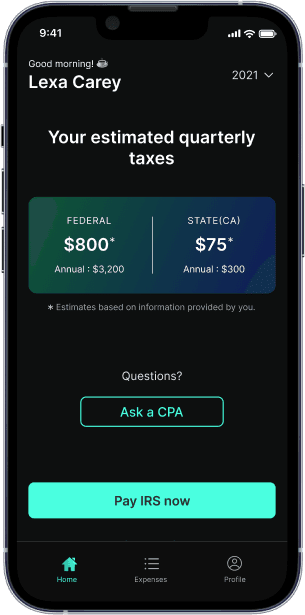
Quarterly tax deadline is Jan 15. See how much you owe penalties
1099 Tax Calculator

Are you self-employed?
This includes freelancers and business owners.
Tracking Uber Taxes: Using an Uber Tax Calculator to Track Expenses
Keeping track of your costs and taxes as a self-employed Uber driver can be a difficult undertaking. Uber provides a tax summary that outlines total earnings from rides, as reported on 1099 forms, helping drivers understand their taxable income and identify deductible expenses. However, understanding the importance of tax forms in tracking expenses and preparing for tax calculations is crucial. You may easily handle the difficulties of tax preparation if you have the appropriate tools and techniques. This post will walk you through the process of using an Uber tax calculator to track your costs. It will cover common deductions, the value of tracking your miles, and real-time expense tracking apps that work well with these calculators.
Table of contents
Understanding Your Tax Obligations as an Uber Driver
As an Uber driver, you are considered an independent contractor, not an employee. This distinction means you have specific tax obligations, including paying your own income taxes, that you must fulfill to avoid penalties or fines. Here are some key points to keep in mind:
- Report Self-Employment Income: You are required to report all your earnings from Uber as self-employment income on your tax returns. This includes fares, tips, and any bonuses you receive.
- Pay Self-Employment Taxes: Unlike traditional employees, independent contractors must pay self-employment taxes, which cover Social Security and Medicare. These taxes are calculated based on your net earnings from self-employment. You may owe self-employment tax even if you have no income tax liability.
- Deduct Business Expenses: To reduce your taxable income, you can deduct various business expenses related to your Uber driving. This includes costs like fuel, maintenance, insurance, and even snacks for passengers.
- Keep Accurate Records: Maintaining detailed records of your business income and expenses is crucial. Accurate record-keeping ensures you can substantiate your deductions and comply with tax regulations. Uber does not withhold taxes from payments, so you must handle your own tax obligations.
Understanding these obligations will help you manage your taxes more effectively and avoid any unexpected surprises during tax season.
Typical Tax Deductions Made by Uber Drivers
Understanding thebusiness tax deductions available to Uber driversis crucial before delving into the realm of tax calculators. Your taxable income might be greatly decreased by these deductions, which will lower your tax liability.
- Gas and Fuel Costs: Fuel is one of the biggest costs for Uber drivers. The cost of gas, along with any fuel additives and vehicle maintenance expenses, is deductible.
- Maintenance and Repairs: Keeping your car in good shape requires routine maintenance and repairs. All of these costs are deductible, including tire replacements, oil changes, and other repairs.
- Insurance: Insurance coverage for your car is a must for Uber drivers. This insurance’s premiums can be written off as company costs.
- Tolls and Parking Fees: Another typical cost for Uber drivers is tolls and parking fees. Although these expenses can mount up quickly, they are completely deductible.
- Vehicle Depreciation: You can also deduct the gradual depreciation of your car if you own it. You can lower your taxable income with this sizable deduction.
- Snacks and Amenities: Offering passengers refreshments and other perks may also be written off as business expenditures. Snacks, bottled water, and other things that improve the traveler experience are included.
- Internet and Mobile Phone Expenses: You can write off some of these expenses if you use your internet or mobile phone for work-related reasons. For instance, you can reduce 25% of your phone cost if you use your phone for business 25% of the time.
- Personal Protective Equipment (PPE): Many Uber drivers have had to pay more for personal protective equipment, such as shields, face masks, and hand sanitizer, as a result of COVID-19. Additionally, these costs are deductible.
The Effect of Mileage Tracking on Your Tax Estimate
To precisely estimate your tax liability, mileage tracking is essential. This is the reason:
- Standard Mileage Rate: You can determine your business mileage deductions using thestandard mileage rateprovided by the IRS. The typical mileage charge for business travel in 2024 is 67 cents per mile.
- Actual Expenses: As an alternative, you can keep tabs on your real driving expenditures, such as petrol, upkeep, insurance, and other expenses associated with your car. This approach can yield a more accurate deduction but necessitates careful record-keeping.
- Mileage Tracking with Uber: You can use Uber's record of kilometers driven with passengers to bolster your mileage deductions. Tracking extra miles traveled for work-related reasons, including waiting for a trip or picking up passengers, is crucial.
Estimating Savings from Business Expenses Using a Tax Calculator
By subtracting business-related expenses, a tax calculator is a useful tool that helps you estimate your tax savings. This is how to make good use of one:
- Input Your Income: To begin, enter your whole Uber income, including all tips, bonuses, fares, and customer payments. Make sure to report all income accurately, as Form 1099-K includes amounts received in customer payments. As an independent contractor, you must pay taxes on your earnings, including tips and bonuses.
- Add Business Expenses: Enter all of your business-related expenses, including petrol, maintenance, insurance, tolls, and other vehicle-related charges. Additionally, you might include costs for PPE, snacks, and cell phone bills.
- Calculate Deductions: Using the expenses you have input, the tax calculator will assist you in determining the overall amount of deductions. Your taxable income will be accurately estimated as a result.
- Check and Modify: Verify that all of the computations are correct. Make any necessary adjustments to the numbers to reflect your true spending.
Apps for Real-Time Expense Tracking
Managing your spending and combining them with a tax calculator can be made much easier with real-time expense monitoring tools. Here are a few well-known apps:
- FlyFin:FlyFin caters to the tax needs of freelancers, gig workers, independent contractors and sole proprietors. It can assist you in keeping track of your earnings, outlays, and taxes.
- Google Sheets or Excel Spreadsheets: For individuals who would rather work by hand, tracking spending with Google Sheets or Excel spreadsheets might be a useful strategy. To track earnings and outlays, compute tax deductions, and provide quarterly and annual summaries, you can design your own templates.
How to Classify and Monitor Automobile Costs
For proper tax preparation, automobile expenses must be tracked and categorized. Here's how to accomplish it:
- Make a Notebook: To keep track of all your business travels, keep a notebook. The date, the start and end times of each journey, and the total number of miles traveled should all be recorded in this diary.
- Separate Bank Accounts: Keep your personal and business expenses in different bank accounts. This facilitates the tracking of business-related transactions and helps you maintain the organization of your records.
- Record Receipts: Keep track of every receipt you have for company spending. When it comes to filing taxes and seeking deductions, these receipts will be crucial. Tax softwares like FlyFin let you capture photos of receipts making the process convenient.
Handling Receipts and Additional Records
Keeping track of receipts and other paperwork is crucial to optimizing your deductions. Here's how to accomplish it:
- Organize Receipts: Arrange all of your receipts in a digital storage system or folder. When needed, this makes it simpler to locate particular receipts.
- Use Expense Monitoring Apps: To automatically record your spending, use expense monitoring apps. Features like automatic categorization and receipt scanning are frequently offered by these apps.
- Review Frequently: Make sure all of your cost records are correct and current by reviewing them frequently.
Calculating Self-Employment Tax
Calculating self-employment tax can seem daunting, but breaking it down into manageable steps can simplify the process. Here’s a step-by-step guide to help you calculate your self-employment tax:
- Determine Your Self-Employment Income: Start by calculating your total income from your Uber driving business. This includes all fares, tips, and bonuses.
- Calculate Business Expenses: Next, tally up all your business-related expenses. This includes mileage, gas, maintenance, insurance, and any other costs associated with your driving business.
- Subtract Business Expenses: Subtract your total business expenses from your self-employment income to determine your net earnings from self-employment.
- Apply the Self-Employment Tax Rate: Multiply your net earnings by the self-employment tax rate, which is 15.3% for Social Security and Medicare taxes.
- Deduct Half of Your Self-Employment Tax: You can deduct half of your self-employment tax as a business expense on your tax return, reducing your overall taxable income.
By following these steps, you can accurately calculate your self-employment tax and ensure you’re meeting your tax obligations.
Filing Your Tax Return
Filing your tax return as an Uber driver involves a few extra steps compared to traditional employees. Here’s what you need to do:
- File Form 1040: This is the standard form for personal income tax returns.
- Attach Schedule C: Use Schedule C to report your business income and expenses. This form helps you calculate your net earnings from self-employment.
- Report Self-Employment Income: On Schedule C, report your gross income from Uber, then subtract your business expenses to determine your net earnings.
- Calculate Self-Employment Tax: Use Schedule SE to calculate your self-employment tax based on your net earnings.
- Attach Form 1099-MISC: If you received a Form 1099-MISC from Uber, attach it to your tax return. This form reports your miscellaneous income, including self-employment income.
By following these steps, you can ensure that your tax return is complete and accurate, helping you avoid any issues with the IRS.
Reporting Business Income
As an Uber driver, accurately reporting your business income is essential for tax compliance. Here’s how to do it:
- Report Gross Income: On Schedule C, report your total income from Uber, including fares, tips, and bonuses.
- Calculate Business Expenses: List all your business-related expenses, such as mileage, gas, maintenance, and insurance.
- Subtract Business Expenses: Subtract your total business expenses from your gross income to determine your net earnings from self-employment.
- Report Net Earnings: Report your net earnings from self-employment on Schedule C. This amount will be used to calculate your self-employment tax on Schedule SE.
By accurately reporting your business income and expenses, you can ensure you’re paying the correct amount of taxes and maximizing your deductions.
Choosing the Right Tax Calculator
Selecting the right tax calculator can make managing your taxes as an Uber driver much easier. Here are some features to look for:
- Designed for Self-Employment Taxes: Choose a calculator specifically designed for self-employed individuals, as it will cater to your unique tax needs.
- Handles Multiple Income Streams: Ensure the calculator can manage various income sources, including your Uber income.
- Calculates Self-Employment Tax and Business Expenses: The calculator should help you accurately calculate your self-employment tax and track your business expenses.
- Offers Audit Protection and Support: Consider a calculator that provides audit protection and access to tax professionals for support.
By choosing the right tax calculator, you can simplify the tax preparation process and ensure you’re accurately tracking your expenses and income.
Advice for Using the Calculator to Maximize Deductions and Minimize Self Employment Tax
Using a tax calculator to maximize deductions requires a number of strategies:
- Be Detailed: When recording your expenses, be as specific as you can. This guarantees you won’t overlook any deductions.
- Use Standard Mileage Rate: Be sure to multiply your total business miles by the IRS rate if you’re utilizing the standard mileage rate. This offers a clear-cut and precise deduction.
- Claim All Qualifying Costs: Make a claim for all qualifying costs, even small ones like snacks or cell phone bills. These minor costs can quickly mount up and lower your taxable income.
- Speak with a Tax Professional: Seek individual guidance from a tax professional if you have questions regarding any deductions. They can guide you through the intricacies of tax preparation and guarantee that you are utilizing all available deductions. Remember, the information shared here is for educational purposes only and not a substitute for professional tax advice. For personalized assistance, always consult with a tax professional.
To sum up, using an Uber tax calculator to track your spending is a simple procedure that can drastically lower your tax obligation. You may optimize your savings and make sure you’re in compliance with tax laws by being aware of frequent deductions, keeping precise mileage records, utilizing real-time cost tracking applications, and efficiently handling receipts. Remain organized, pay attention to details, and seek advice from a tax expert if necessary. You’ll be well on your way to becoming an expert at tracking expenses and doing taxes as an Uber driver if you follow these tips. For more information ondeductions for self-employed individuals, explore additional resources that can help you maximize your tax savings.
Quarterly Estimated Taxes and Filing Requirements
As an Uber driver, you are required to make quarterly estimated tax payments to the IRS. This is because you are considered self-employed and are responsible for paying your own taxes. The due dates for quarterly estimated tax payments are:
- April 15thfor the first quarter (January 1 - March 31)
- June 15thfor the second quarter (April 1 - May 31)
- September 15thfor the third quarter (June 1 - August 31)
- January 15thof the following year for the fourth quarter (September 1 - December 31)
You can use Form 1040-ES to make your quarterly estimated tax payments. Additionally, the Electronic Federal Tax Payment System (EFTPS) allows you to make online payments, making the process more convenient.
In addition to making quarterly estimated tax payments, you will also need to file your annual tax return (Form 1040) by April 15th of each year. On this return, you will report your business income and expenses on Schedule C, and calculate your self-employment tax on Schedule SE. Keeping up with these requirements ensures you stay compliant and avoid any penalties.
Seeking Tax Advice and Resources
Navigating the complexities of tax laws can be challenging, which is why seeking tax advice from a qualified tax professional is highly recommended. They can help you understand the nuances of tax deductions and credits available to you as an Uber driver.
Here are some resources to find a tax professional:
- IRS Directory: The IRS website (irs.gov) has a directory of tax professionals certified by the IRS.
- National Association of Enrolled Agents (NAEA): This professional organization (naea.org) consists of tax professionals certified by the IRS.
- American Institute of Certified Public Accountants (AICPA): This organization (aicpa.org) includes certified public accountants who can provide expert tax advice.
Alternatively, you can use online tax preparation software like TurboTax or H&R Block. These programs guide you through the tax preparation process and help you identify eligible tax deductions and credits, making it easier to file your tax return accurately.
Avoiding Common Tax Mistakes
As an Uber driver, there are several common tax mistakes that you should avoid to ensure compliance and maximize your deductions:
- Inaccurate Record-Keeping: Failing to keep accurate records of your business income and expenses can complicate the calculation of your self-employment tax and lead to penalties.
- Underreporting Income: Not reporting all of your business income, including fares, tips, and bonuses, can result in fines and affect your eligibility for deductions.
- Missing Deductions: Overlooking tax deductions and credits can lead to paying more taxes than necessary. Ensure you claim all qualifying expenses.
- Skipping Quarterly Payments: Not making quarterly estimated tax payments can result in penalties and affect your eligibility for certain deductions.
To avoid these mistakes, maintain detailed records of your business income and expenses, and seek tax advice from a qualified professional. This proactive approach will help you stay compliant and optimize your tax situation.
Tax Planning Strategies for Uber Drivers
Effective tax planning can significantly reduce your tax liability. Here are some strategies to consider:
- Accurate Record-Keeping: Keep detailed records of your business income and expenses. This helps in identifying all possible tax deductions and credits.
- Maximize Deductions: Take advantage of all available tax deductions, such as those for business use of your car, mobile phone, and other related expenses.
- Quarterly Estimated Payments: Making timely quarterly estimated tax payments helps you avoid penalties and ensures you stay on top of your tax obligations.
- Consider Incorporation: Incorporating your business can offer tax benefits, such as the ability to deduct business expenses on a corporate tax return.
- Hire a Tax Professional: A tax professional can provide personalized advice, helping you navigate tax laws and maximize your deductions.
By implementing these tax planning strategies, you can minimize your tax liability and retain more of your hard-earned money.
What’s FlyFin?


Expert tax CPAs ensure 100%-accurate tax filing

A.I. finds every tax deduction, eliminating 95% of your work

On average users save $3,700