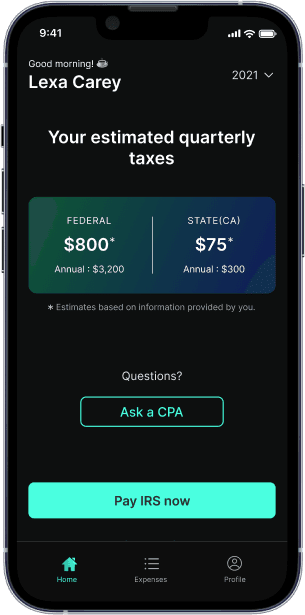
Quarterly tax deadline is Jan 15. See how much you owe penalties
1099 Tax Calculator

Are you self-employed?
This includes freelancers and business owners.
Doordash Tax Calculator: Which Documents Are Required?
As a DoorDash driver, you are classified as an independent contractor, which means you are responsible for managing and paying your own taxes. This includes federal and state income taxes, as well as self-employment taxes. Unlike traditional employees, who have taxes withheld from their paychecks, independent contractors must handle their own tax obligations. This includes paying both the employee and employer portions of Social Security and Medicare taxes, which are collectively known as self-employment taxes.
Table of contents
What Taxes Do DoorDash Drivers Pay?
DoorDash drivers, as independent contractors, must pay several types of taxes. First, you are responsible for federal income tax, which is based on your total earnings. Additionally, you must pay state income taxes, which vary depending on your state’s tax laws. One of the most significant tax obligations for DoorDash drivers is self-employment taxes. These taxes cover Social Security and Medicare, and as an independent contractor, you must pay both the employee and employer portions. This means you are responsible for the full 15.3% self-employment tax rate, which includes 12.4% for Social Security and 2.9% for Medicare.
Comprehending Non-Employee Compensation Form 1099-NEC
You are considered an independent contractor as a DoorDash driver. As a DoorDash driver, you are considered an independent contractor, which implies that you are in charge of handling and filing your own taxes, including self employed tax obligations. The IRS Form 1099-NEC is one of the most important documents you’ll need to file your taxes. Non-employee remuneration, which includes earnings from freelancing labor like driving for DoorDash, is reported using this form. What you should know about the1099-NEC formis as follows:
To Whom Does It Go?If you make $600 or more a year, DoorDash will send you a 1099-NEC form. In order to submit your income on your tax return, you must use this form.
What Does It Illustrate?Your complete earnings from DoorDash, including basic salary, tips, and any pay increases or milestones you’ve reached, are listed on the 1099-NEC form.
How Can I Obtain It?DoorDash uses Stripe to transmit the 1099-NEC form. An email encouraging you to create a Stripe Express account in order to view your tax data and obtain your 1099-NEC form will be sent to you.
1099-NEC vs 1099-K
At the end of the year, DoorDash drivers may receive either a 1099-NEC or a 1099-K form, depending on their earnings and the number of transactions they have completed. The 1099-NEC form reports non-employee compensation, which includes your earnings from DoorDash. On the other hand, the 1099-K form reports payment card and third-party network transactions. If you have more than 200 transactions and earn over $20,000 in sales, you may receive a 1099-K form instead of a 1099-NEC. Understanding the differences between these forms is crucial for accurate tax reporting.
How to Find Your 1099-NEC
To access your 1099-NEC form, log in to your Payable account, where you can review and download your tax documents. If you encounter any issues accessing your form, you can contact DoorDash support for assistance. Remember, you will only receive a 1099-NEC form if you earned more than $600 in the previous year. Keeping track of your earnings throughout the year can help ensure you receive the correct tax documents.
When Drivers for DoorDash Get Their 1099 Form
Getting your 1099-NEC form is an essential part of getting ready for tax season. Here's what to anticipate:
- Paper copy versus E-delivery:By January 31, 2024, via your Stripe Express account, you should receive your 1099-NEC form if you consent to e-delivery. The form will be mailed out by January 31 if you want to send it via snail mail, though it might take up to 10 business days to arrive.
- Email Not Received?You may receive a hard copy of your 1099-NEC form in the mail if Stripe doesn't send you an email by the middle of January. To ensure you receive the email labeled "Confirm your tax information with DoorDash," be sure to check your spam folder.
How to File an Income Report Without a 1099
Although it's preferable to receive a 1099-NEC form, there are other ways to record your income. Even if you didn't receive a 1099-NEC, you can still appropriately report your income:
- Track Your Earnings:Maintain a record of your annual income. By choosing Earnings on the Dasher app, you can see this data. This will assist you in figuring out your net business earnings—a figure that must be included in your tax return.
- Mercerers' Form 1099-K:A Form 1099-K may be sent to you instead if you are a merchant with 200 transactions and above $20,000 in sales. This form is essential for tax reporting as well as providing an overview of your sales activities.
Additional Forms You Might Need to File Your Taxes
Even while the 1099-NEC form is necessary, you might also require the following forms in order to properly submit your taxes:
Timetable C
Timetable SE
Form 1040
IRS DoorDash Income Form 1099-NEC
Compensation for non-employees is explicitly reported on IRS Form 1099-NEC. What you need know about utilizing this form to get money from DoorDash is as follows:
Aim:The 1099-NEC form is mostly used to report revenue from freelance labor, such as driving for DoorDash. This form facilitates precise tracking of non-employee compensation by the IRS and state tax authorities.
Reporting Earnings:You must include this revenue on your tax return when you receive your 1099-NEC form. In particular, Schedule C of your Form 1040 is where you report it. By deducting business expenses from your overall business income, you can use this schedule to calculate your net business earnings.
IRS Schedule C: Business Income, Deduction Reporting, and Self Employment Tax
A Schedule C is an essential paperwork for independent contractors such as DoorDash drivers. This is how to apply it:
Revenue from Business:You report all of your business revenue, including the money you make from driving for DoorDash, on Schedule C. This covers base pay, gratuities, as well as any raises or bonuses.
Expenses for Business:All business expenses are also recorded on Schedule C. These fees may include upkeep for your car, petrol, phone bills, and any other costs associated with your employment as a DoorDash driver. You can lessen your tax liability and taxable income by deducting these expenses from your overall business income.
IRS Form 1040 for Determining Total Amount Due
Your primary tax return document is Form 1040. This is how it fits into the overall image:
Examination of Tax Circumstance:Form 1040 provides an overview of your whole tax scenario. It offers a breakdown of your overall income and deductions together with personal details like your address and Social Security Number.
Combining Structures:You will need to integrate the data from Schedule C and your 1099-NEC form with Form 1040 when completing your taxes. This helps you determine your total tax burden by ensuring that you record all of your income and deductions appropriately.
Self-Employment Tax Obligations
As a self-employed individual, you are responsible for paying self-employment taxes on your net earnings from self-employment, which includes your income from DoorDash. Self-employment taxes cover Social Security and Medicare, and the self-employment tax rate is 15.3% of your net earnings. This rate includes 12.4% for Social Security and 2.9% for Medicare. It’s important to calculate and pay these taxes accurately to avoid any penalties or interest. Additionally, you may need to make quarterly estimated tax payments to cover your federal income tax and self-employment tax obligations throughout the year. Keeping detailed records of your business expenses can help reduce your taxable income and lower your overall tax bill.
Making the Most of Tax Deductions
Making the most of your tax deductions is essential if you work for yourself in order to lower your taxable income. Here are some pointers:
Automotive Costs:Automobile costs such as gasoline, upkeep, and depreciation are deductible. Maintain thorough documentation of these costs to guarantee correct reporting.
- Call Bills:You can write off the percentage of your phone bill that is attributable to business use if you utilize your phone for that purpose. Maintain documentation and receipts to back up these deductions.
Office at Home Deduction:You may be able to claim the home office deduction if you have a specific area in your house that you use for business. This can cover costs for internet, utilities, and other space-related fees.
Quarterly Estimated Tax Payments
Final Thoughts
Although navigating DoorDash taxes can be difficult at first, it can be made easier with the correct knowledge. Your key to accurately reporting compensation to non-employees is the 1099-NEC form. Knowing how to use Schedule C, Form 1040, and this form can help you make sure that your taxes are filed accurately and that you are taking advantage of all available deductions. Don't forget to maintain thorough records of your earnings and outlays, and don't be afraid to consult a tax professional for assistance if necessary. You will be ready to manage your DoorDash taxes like an expert if you follow these instructions.
Through adherence to these instructions and comprehension of the necessary paperwork and procedures associated with completing your DoorDash taxes, you may steer clear of frequent problems and guarantee that you are compliant with tax laws. Recall that managing and paying your own taxes is your obligation as a self-employed person. Maintaining organization and maintaining precise documentation will help you have a stress-free tax season. Additionally, consider using tools totrack mileage for taxeseffectively, as this can significantly impact your deductions.
What’s FlyFin?


Expert tax CPAs ensure 100%-accurate tax filing

A.I. finds every tax deduction, eliminating 95% of your work

On average users save $3,700